How do I adjust audio volume levels in the video editor?
David
Updated
⚠️ Note: You need to enable system audio in order apply audio settings - see How can I include my computer's sound in an Airtime Recorder recording?
Click the Audio button in the editor toolbar to open the Audio levels panel.

You'll see two vertical sliders: one for your microphone and one for your computer audio, which you can adjust independently.
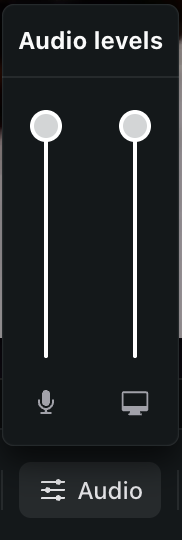
Drag a slider up to increase that source's volume, down to decrease it, or all the way down to mute it entirely.
Will this affect my original recording?
No. Adjustments only affect how audio is mixed. You can always return to the Audio panel and change the levels again.
Still need help? Submit a support ticket or email us at help@airtime.com.
Search by entering keywords
sections/33869881702295
/hc/theming_assets/01JSH0VM12PABYRMCFJ374HMNE
Get Started Guide
New to Airtime? We've got you covered.
custom
https://help.airtimetools.com/hc/categories/33869091093015
/hc/theming_assets/01JSH0X1T0PF89824XQTV3B7VD
Browse by Tool
Find resources tailored to each of our tools.
custom
https://help.airtimetools.com/hc/categories/33869082730903
/hc/theming_assets/01JSH0W0SWMKCZG047XMZFC936
Troubleshoot
Find quick fixes for common issues, such as error messages and technical problems.
custom
/hc/categories/9507497805079
/hc/theming_assets/01JSH0XER1XHF11B280QRKFBDG
Accounts and Billing
Everything about billing, payment, and managing your account.
